
General
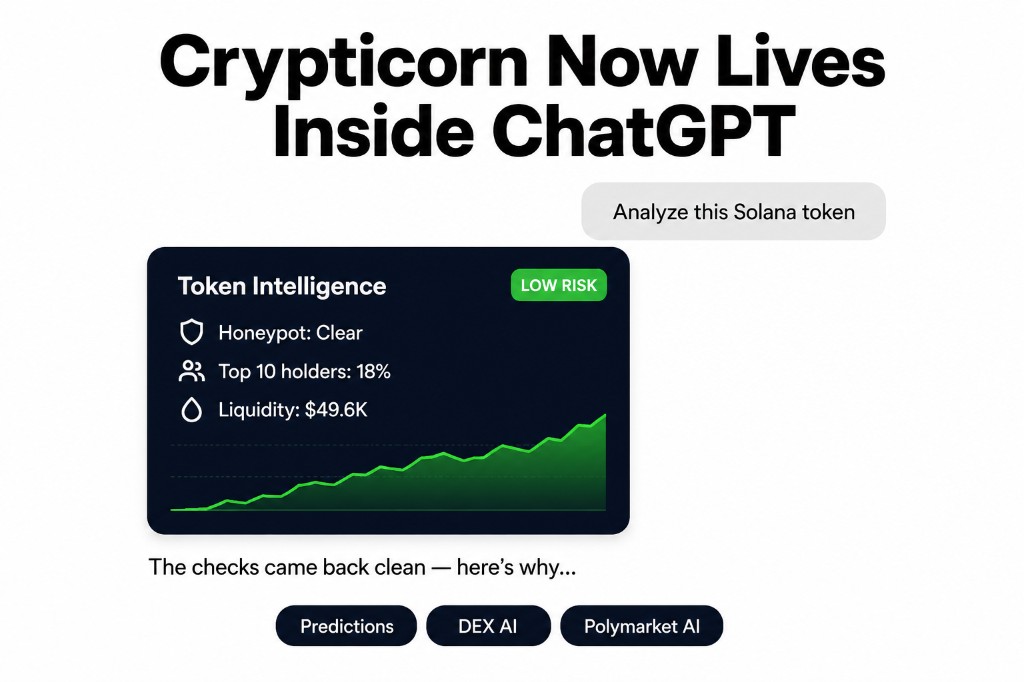
Crypticorn now lives inside ChatGPT. Connect our app once, and you can ask for AI price projections, deep on-chain token intelligence, and prediction-market pattern analysis in plain English - and get back live, interactive charts rendered right in the conversation, with ChatGPT itself explaining the numbers. No tabs, no dashboards, no copy-pasting data into prompts.
This guide covers everything: what the app includes, how to add it to your ChatGPT account step by step, how to read each chart, and how plans and access work. Last updated: July 2026.
Direct Answer
The Crypticorn app for ChatGPT connects Crypticorn's analytics to your ChatGPT account through an MCP server (Model Context Protocol - the open standard behind ChatGPT apps). Once connected and signed in, you ask questions like "what does the model project for ETH?" or "analyze this Solana token", and ChatGPT calls Crypticorn's tools and renders interactive charts inline. It's read-only by design - it never trades, never touches wallets - and your existing crypticorn.com subscription unlocks it; nothing is sold inside ChatGPT.
Key Takeaways
- Three products in one app: AI Price Prediction (probability-cone forecasts), DEX AI (on-chain token intelligence and signals), and Polymarket AI (pattern-matched return distributions).
- Real interactive widgets, not screenshots - the same chart engine and palette as the Crypticorn dashboard, with fullscreen, light/dark theming, and "Open in Crypticorn ↗" deep links.
- ChatGPT reads the numbers, not just the picture - every chart hands it structured data, so follow-ups like "which horizon is most bullish?" get specific, numeric answers.
- Setup takes about two minutes: enable developer mode, add the connector URL, sign in with your Crypticorn account.
- Access mirrors your plan live - each tool unlocks with the plan that includes it, checked on every call. No purchases inside ChatGPT.
- Everything is informational and probabilistic - analytics to reason with, not signals to act on blindly.
How to Add Crypticorn to Your Chatgpt Account
You'll need a Crypticorn account with at least one product in your plan (Price Prediction, DEX AI, or Polymarket AI) and a verified email. Then:
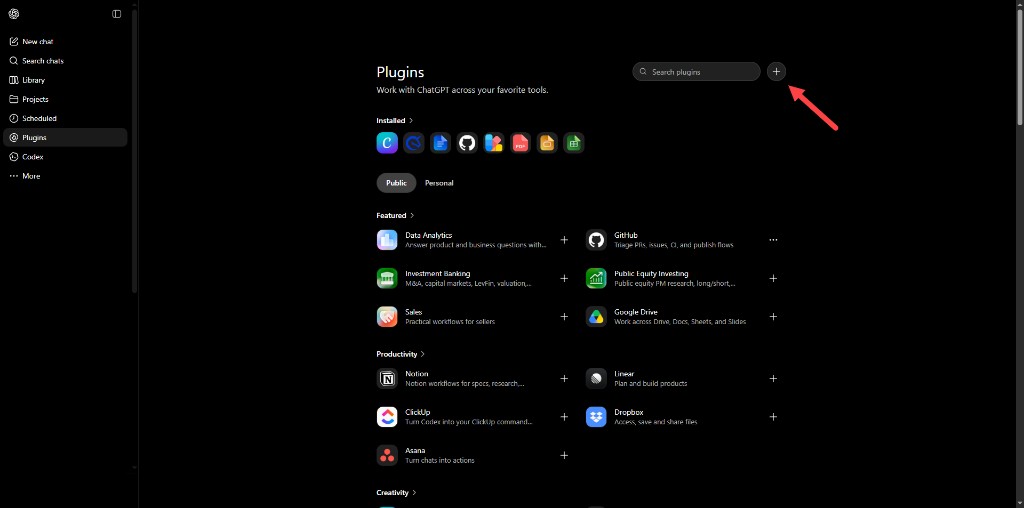
- Open the Plugins page in ChatGPT. In the ChatGPT sidebar, click Plugins, then hit the + button (top right, next to the search bar) to add a new one. If you don't see the option, enable developer mode first (ChatGPT Settings → advanced/developer options) - custom apps require it while the Crypticorn app completes ChatGPT's directory listing.
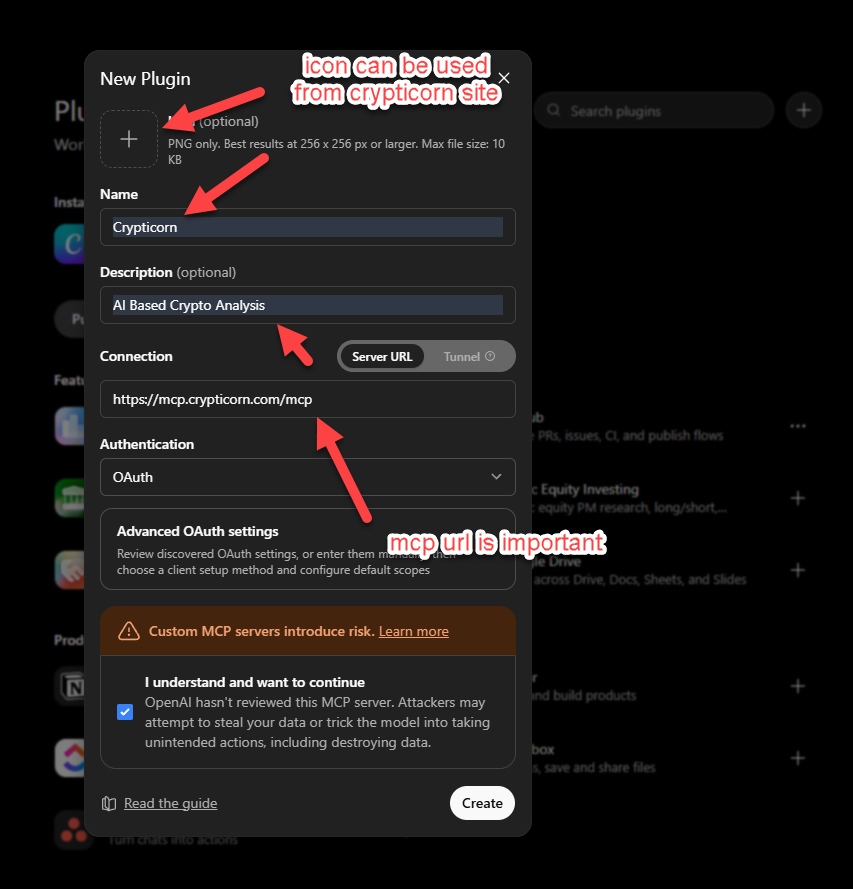
- Fill in the New Plugin form.
- Name: Crypticorn (description is optional - "AI Based Crypto Analysis" works; you can grab an icon from the Crypticorn site)
- Connection → Server URL:
https://mcp.crypticorn.com/mcp- this is the important field - Authentication: OAuth (the default discovered settings are correct - no manual configuration needed)
- Tick the acknowledgment for custom MCP servers (standard ChatGPT notice for any app added manually) and click Create.
- Sign in with your Crypticorn account. ChatGPT opens a secure sign-in - use the same email as your Crypticorn dashboard login (email + password or Google), and make sure it's verified. This email is the link between ChatGPT and your subscription: once you're signed in, the tool is connected.
- Just ask. No commands, no tool names - ChatGPT picks the right tool from natural language, and each product unlocks based on your role in the Crypticorn dashboard (your active plan):
- "What does Crypticorn's model project for BTC over the next few hours?"
- "Show me the top DEX signals from the last 24 hours."
- "Analyze this Solana token:
<contract address>" - "How bullish is ETH on the Polymarket 15-minute view?"
- Interact with the chart. Expand to fullscreen, open "How to read this" for a plain-English glossary, tap an "Ask ChatGPT" chip (like "Is this token safe?") for an instant explanation, or click "Open in Crypticorn ↗" to continue in the full dashboard.
- Ask follow-ups. ChatGPT holds the underlying numbers, so "which horizon is most bullish?", "why is this token rated Watch?", and "compare that with ETH" all get real answers.
What's Inside: the Three Products
AI Price Prediction - the probability cone
Ask about a crypto pair (BTCUSDT, ETHUSDT, and other major USDT pairs) and you get Crypticorn's AI price-prediction model projecting forward in 15-minute steps out to roughly 6 hours. The widget shows recent real candlesticks on the left and a shaded forward probability cone on the right: the P10–P90 band with the P50 median path down the middle, and price tags showing where the low edge, median, and high edge land at the final horizon.
How to read it: the P10–P90 band is the range that historically contained about 80% of the model's scenarios - not a floor or ceiling. P50 is a median midpoint, not a target price. And the cone fans out to the right because forecasts further ahead are less certain - uncertainty grows with time.
ChatGPT explains the rest from the data: current base price, the expected direction and % change of the median path, and the absolute P10/P50/P90 prices at the final horizon. Try: "How wide is the uncertainty on ETH right now?"
Requires the Price Prediction plan. The same models power our Prediction Dashboard.
DEX AI - token intelligence and signals
Three tools, one product. Two are quick tables: recent DEX signals (with performance multiples, chain, and market cap at call time - filterable by chain: Solana, Ethereum, BSC, Base, Arbitrum, Polygon, Avalanche) and the top-performing signals of the last 24 hours. Try: "Show me the latest Crypticorn DEX signals on Solana."
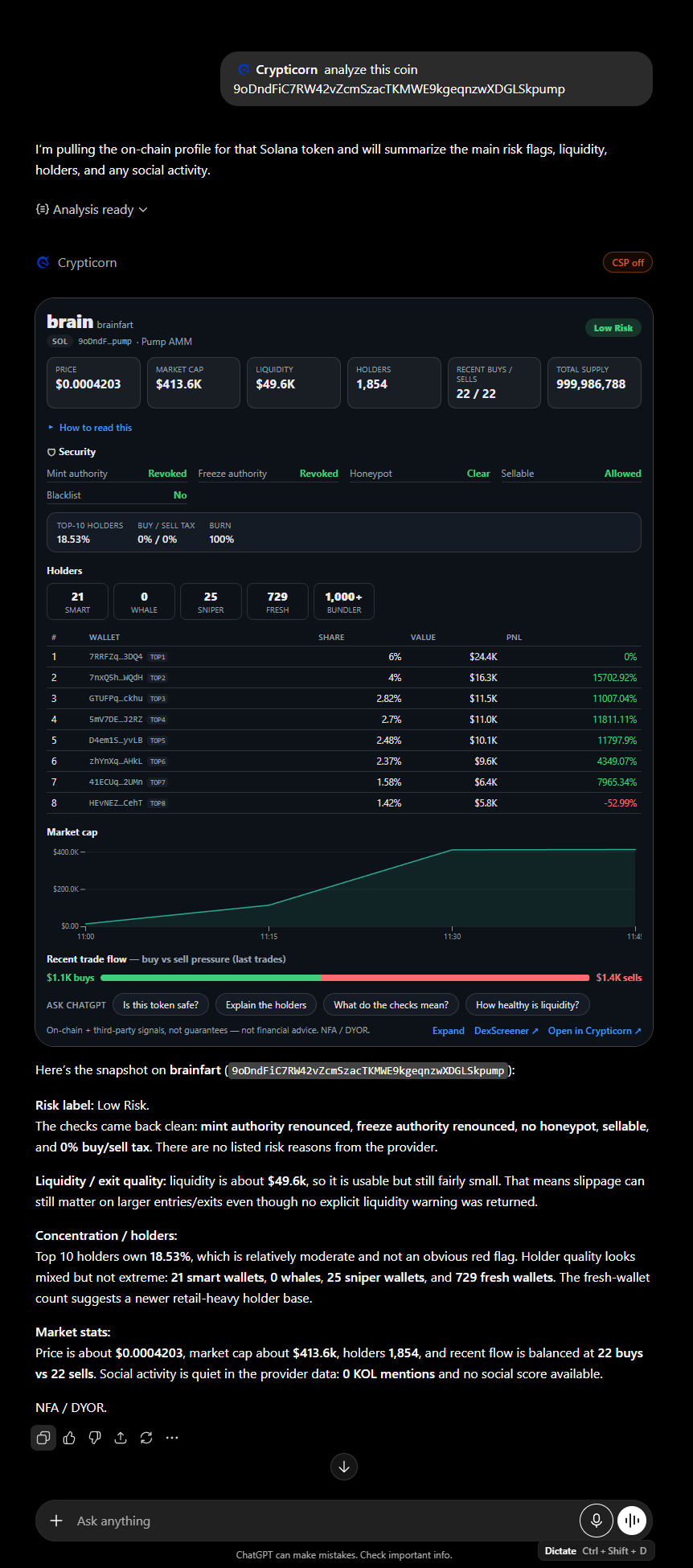
The flagship is full token analysis: paste any Solana contract address - tracked signal or not - and get the same on-chain intelligence as the Crypticorn dashboard's token page:
- Security risk verdict - a color pill (green Low Risk / amber Watch / red High Risk) with the specific reasons, like "mint authority not renounced" or "top-10 holders own 62%".
- Security checks - mint & freeze authority, honeypot flag (can buyers sell?), sellability, transfer taxes, holder concentration, burned supply.
- Market tiles - price, market cap, liquidity (with an explicit low-liquidity warning under ~$10k), holder count, supply.
- Holder breakdown - smart money, snipers, whales, fresh wallets, and bundlers, plus the largest holders with share, value, and PnL.
- Market-cap chart, buy/sell flow, and social activity when available.
One honest note: security flags are analytical signals, not guarantees - some tokens return sparse data, and a clean scan is a filter, not a promise. It's the automated version of the five-step token evaluation we recommend running before touching any new token. EVM (0x…) addresses get a clear "Solana only" message.
Requires the DEX AI plan (all three tools). More on the product: DEX AI Trading.
Polymarket AI - pattern-matched distributions
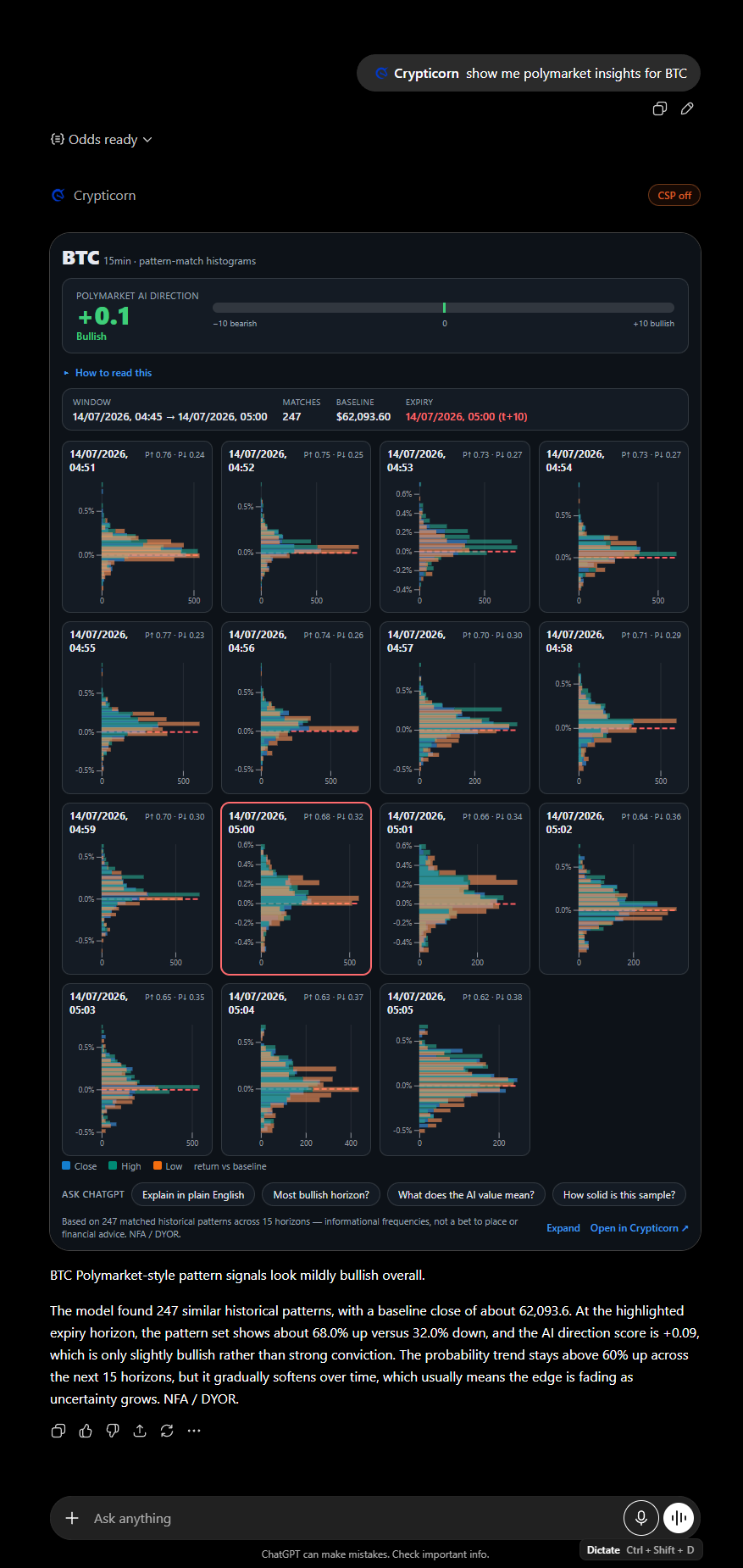
For BTC, ETH, SOL, or XRP at a chosen interval (15-minute is the primary view; 1h and 4h are accepted), Crypticorn finds a large set of historical moments that look like the current market setup and shows how price behaved afterwards.
The widget is a grid of 15 small histograms, one per forward horizon (t+1 through t+15), each showing the distribution of returns versus the baseline price, with a 0% reference line and the expiry horizon highlighted. Above the grid sits the AI direction value - a single directional lean from −10 (bearish) to +10 (bullish). Direction only, not a price target.
The critical framing: these are historical pattern-match frequencies, not order-book odds - and never a wager suggestion. The histograms describe what similar past setups did; markets price what the crowd currently believes. (If that distinction interests you, it's the entire subject of how Polymarket's Bitcoin odds actually work.) ChatGPT will also tell you how many historical patterns were matched - more matches means a fuller, more reliable picture - and how the up-move probability trends across all 15 horizons.
Try: "How do the next 15 horizons look for ETH?" or "What's the AI direction value for SOL?"
Requires the Polymarket AI plan. Related product: Up/Down Crypto Predictions.
Plans and Access: how the Gating Works
Access mirrors your Crypticorn subscription live. Each tool is unlocked by the plan that includes it - Price Prediction, DEX AI, or Polymarket AI - and entitlements are checked server-side on every call, the same way the dashboard gates access. Access appears as soon as your plan is active and lapses when a subscription ends.
If a product isn't in your plan, ChatGPT shows a neutral "not in your plan" message naming the plan you'd need. There's no purchase flow inside ChatGPT - subscriptions live on crypticorn.com/pricing. The link between ChatGPT and your Crypticorn account is your verified email - so if you're denied unexpectedly, check that you signed in with the same email as your subscription and that it's verified.
Security and Privacy
- Read-only. The app cannot execute trades, move funds, connect wallets, or change anything on your account. (Trade-execution apps are categorically disallowed on OpenAI's platform.)
- Standard OAuth 2.1 sign-in with your existing Crypticorn credentials; every request's token is verified, and the system fails closed - any doubt means no data.
- The chart widget never sees a secret. It runs in a sandboxed iframe that makes no network calls of its own; all market data is fetched server-side, and your sign-in token never travels to the data APIs.
- No personalized financial profiling. The app never asks about or adapts to your personal finances, goals, or risk tolerance.
Faq: the Crypticorn Chatgpt App
Which coins does the Crypticorn ChatGPT app support?
Price predictions cover major USDT pairs like BTCUSDT and ETHUSDT. Polymarket AI covers BTC, ETH, SOL, and XRP at 15-minute, 1-hour, and 4-hour intervals. DEX token analysis works for any Solana token by contract address, whether or not it's a tracked signal.
Does the app trade for me?
No. The app is read-only by design: it cannot execute trades, connect wallets, move funds, or modify your account. It provides analytics and explanations - decisions stay entirely with you.
Do I pay for anything inside ChatGPT?
No. Your existing crypticorn.com subscription unlocks the matching tools automatically - access is checked live against your plan. There is no checkout, upgrade, or payment flow inside ChatGPT.
Why does it say a product is "not in your plan"?
Either that product (Price Prediction, DEX AI, or Polymarket AI) isn't part of your active subscription, or you signed into the app with a different email than your Crypticorn account - or with an unverified email. Check the email first; it's the account link.
Is this financial advice?
No. Everything the app returns is informational and probabilistic - forecasts, distributions, and risk flags to reason with, not instructions to act on. See the disclaimer below.
Final Takeaway
- One two-minute setup connects predictions, DEX intelligence, and Polymarket pattern analysis to plain-English conversation.
- The charts are the real thing - interactive, dashboard-identical, explained by ChatGPT with the actual numbers behind them.
- Your subscription is the key; ChatGPT is just the new door.
- Read-only, fails closed, no profiling - analytics without custody.
If you already have a Crypticorn plan, adding the app takes less time than reading this article did. If not, plans are at crypticorn.com/pricing - and everything above works the moment your plan is active.
Crypticorn provides informational crypto and market analysis, including probabilistic forecasts, DEX signal analytics, and prediction-market pattern analysis. It does not provide financial advice, does not execute trades, and is not a substitute for a licensed professional. Figures are probabilistic and uncertain. NFA / DYOR.
Author: Johannes Thüroff, M.Eng. | Last updated: July 2026
See Disclaimer.
Automate crypto prediction markets
New to crypto trading?
Further reading
Sin categoría
Top 10 Metrics To Consider During Fundamental Analysis
Sin categoría
DEUTSCH Tutorial: Metamask Wallet einfach erstellen
General
What Is a Death Cross in Crypto Trading? SMA, EMA explained
General
What is the difference between APR and APY in Crypto?
General
What is crypto scalping? Profitable Scalping Crypto Beginner
General