
Crypto Futures
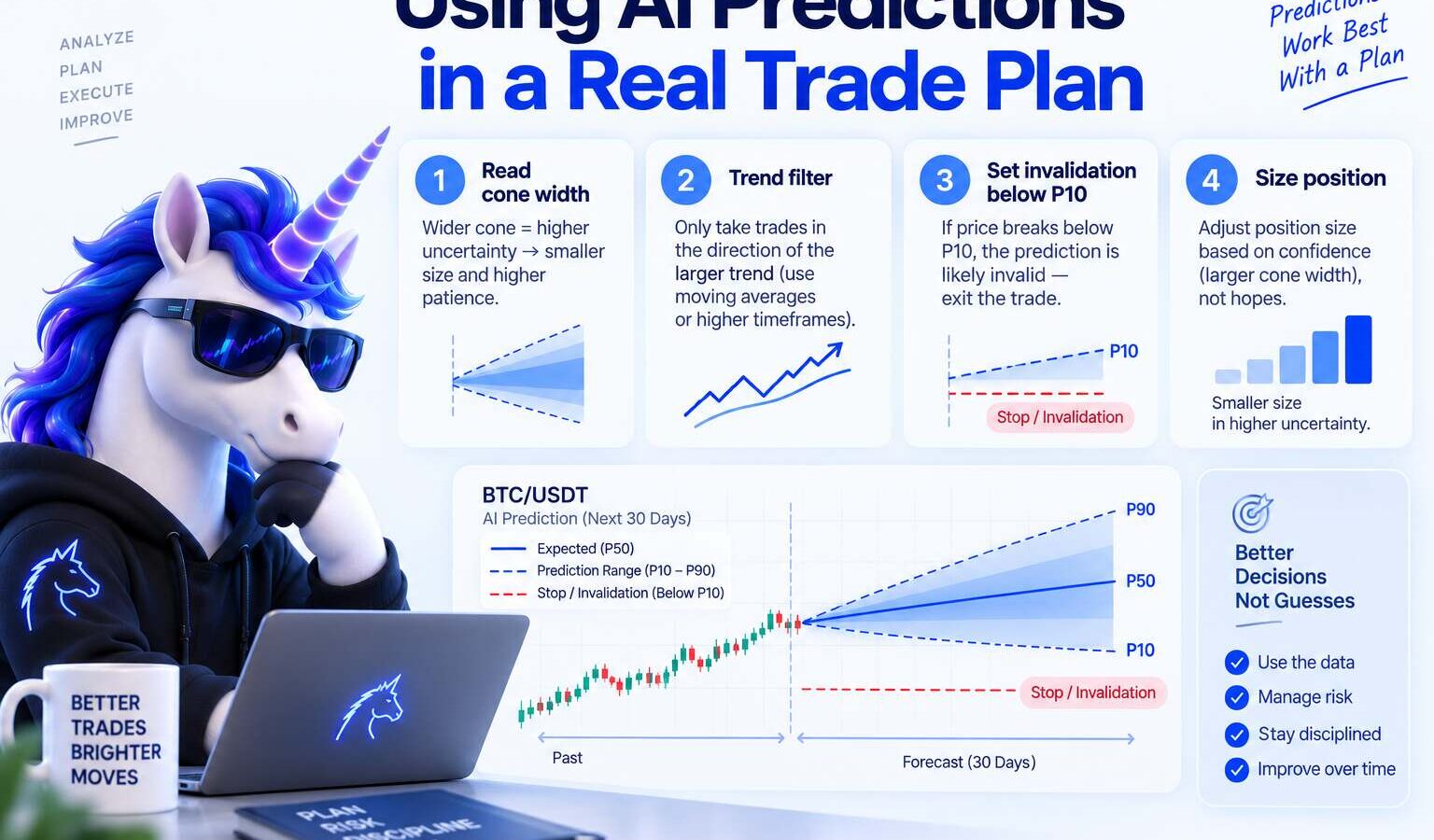
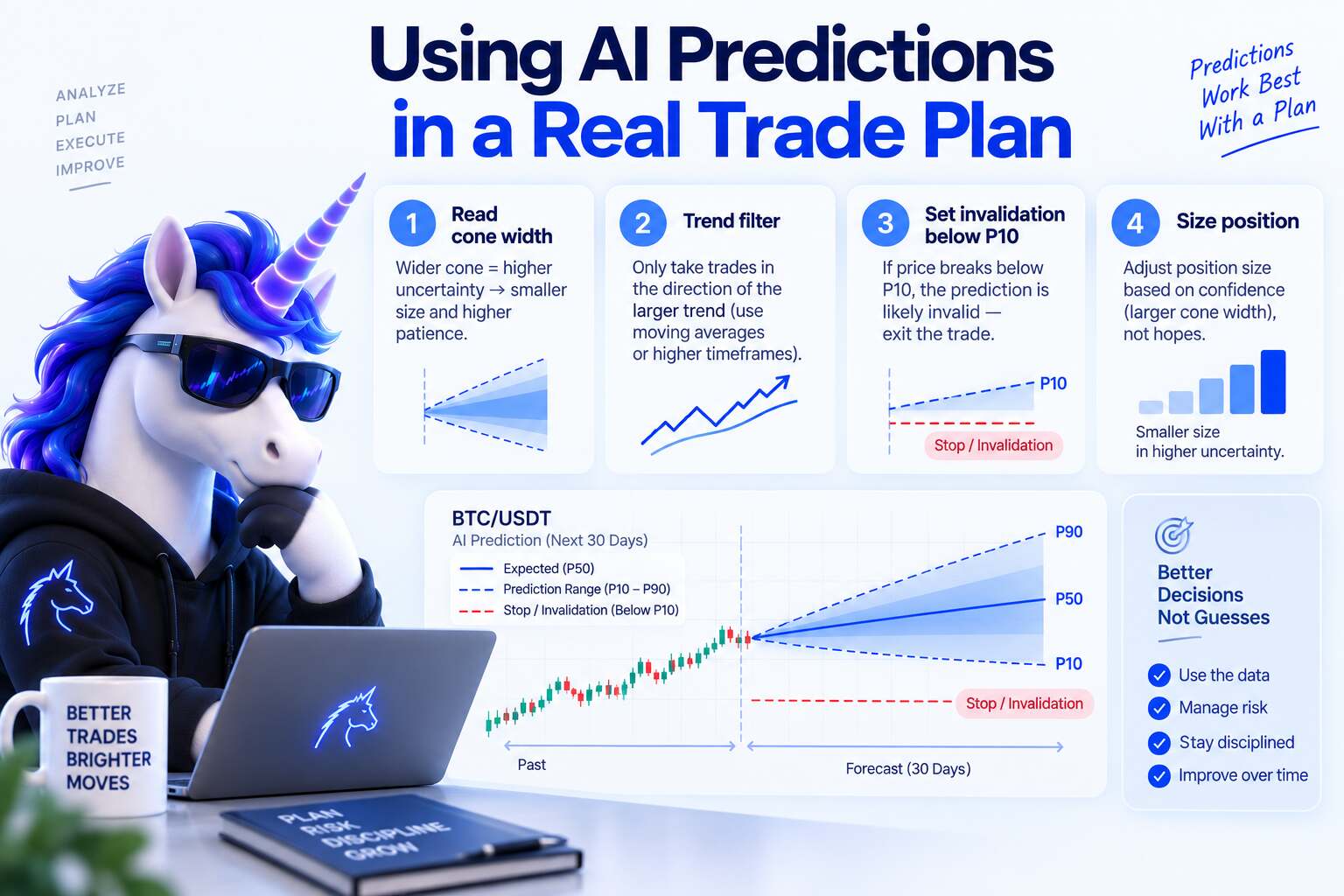
I build and trade with AI crypto price tools daily. When people ask how to use AI crypto predictions for trading, they usually want a green arrow. What they need is a workflow: read the cone, decide if the window is tradable, size small, and log outcomes. This page is that workflow on Crypticorn's Prediction Dashboard, with the same probabilistic framing we use in the product. Last updated: August 2026. Not financial advice.
Direct Answer
To use AI crypto predictions for trading, treat the model output as a structured prior, not an entry signal. Open the dashboard, pick a coin the model actually covers, read the P10–P90 probability band (wide band = skip), compare the median path to your planned hold time, sanity-check against the live chart, then size with a hard risk cap (for example 1% of equity if that matches your plan). The prediction tells you how uncertain the next window is; your stop, venue liquidity, and fees still decide whether a trade is worth taking.
Key Takeaways
- AI predictions are priors, not orders to buy or sell. If the UI feels like a signal service, you are using it wrong.
- P10–P90 bands are the honest format: the outer band is where price often lands; the median line is a central path, not a guarantee.
- Wide cone = skip. A fat band means the model is uncertain. Overtrading those windows is how accounts bleed.
- Match model refresh speed to hold time (short session vs swing). Do not force a 15-minute read into a multi-day hold.
- Always compare to live candles on your exchange before you trust a newer pair.
- Context lives in the complete AI prediction guide, accuracy article, and what AI prediction is, and risks to navigate.
How I Use the Prediction Dashboard
I start on the Prediction Dashboard when I want a structured read on trend and volatility before I size a trade. If candles and trends are new to you, skim crypto trading basics first. This guide assumes you know what a candle is.
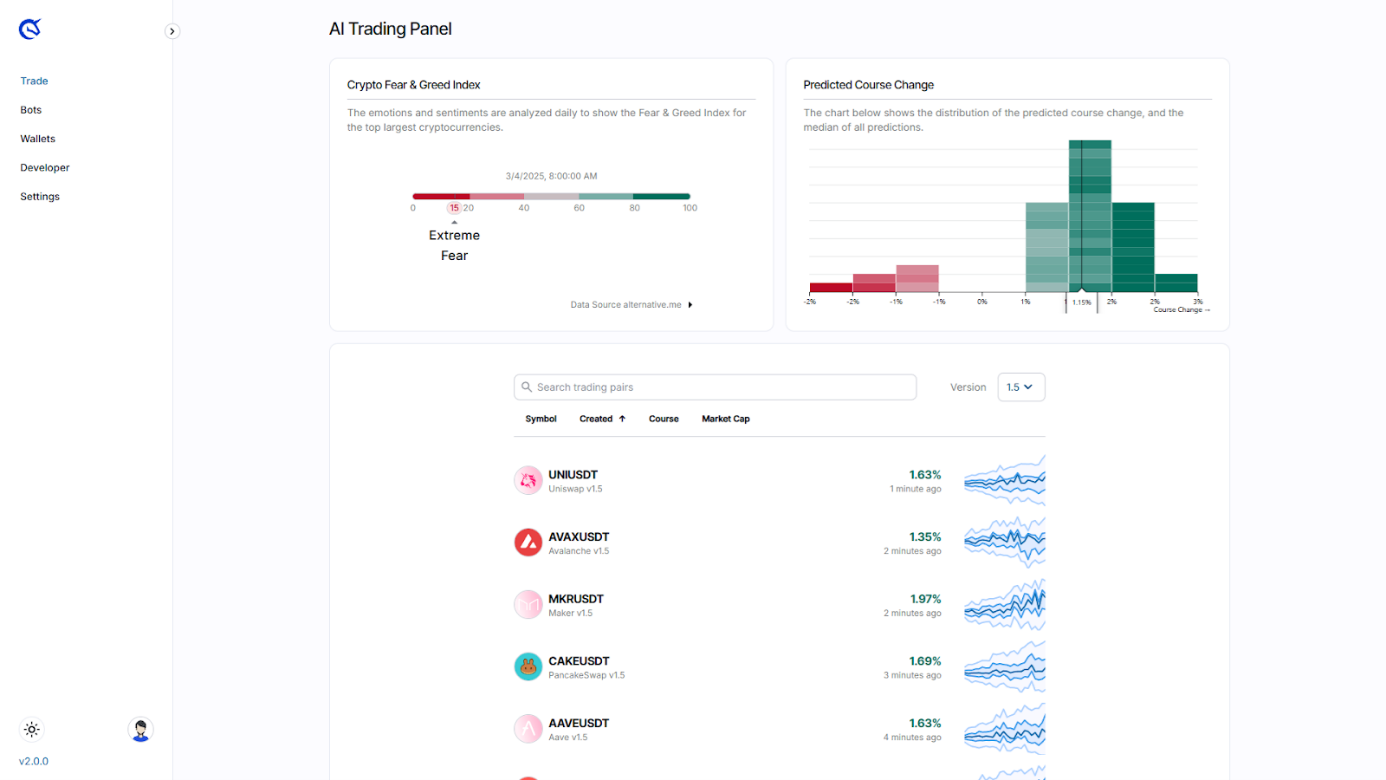
Fear and Greed index: a sentiment checkpoint
The Crypto Fear & Greed Index summarizes how traders are positioning emotionally. Fear usually shows up when people worry about lower prices; greed shows up when they chase upside. Scores run from 0 (very fearful) to 100 (very greedy). I treat it as context, not a trade signal by itself.
Coin coverage: what the model was trained on
The trained-coin list tells you which markets the model actually sees often. If your token is not on the list, I assume predictions are weaker until I validate them manually against live price action.

AI 1.4 vs 1.5: how I pick a version
- AI 1.4: Faster refresh, built for short holding periods (minutes to roughly half an hour). I reserve it for active sessions, not for beginners.
- AI 1.5: Slower refresh, steadier distributions for swings measured in hours to weeks. This is my default when onboarding someone new.
Select the market first, then align the AI version with how long you plan to hold. If you are still calibrating size and stops, stay on 1.5 until the workflow feels boring.
Reading the Probability Cone (p10–p90)
Serious AI price tools do not output one magic number. They output a probability cone:
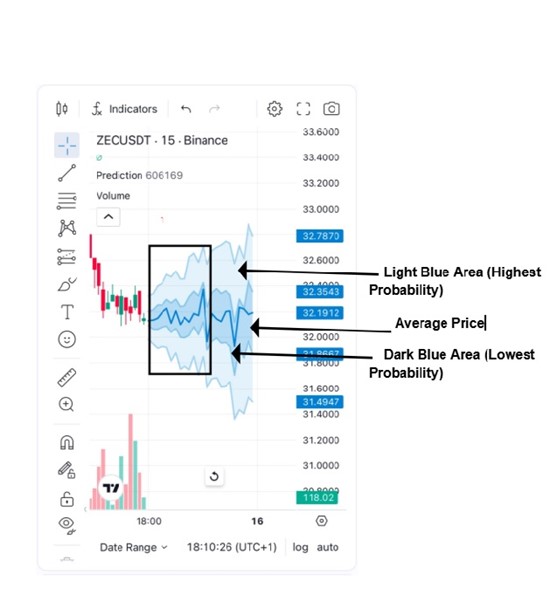
- Median path (blue line): The central estimate for where price settles in the prediction window.
- P10–P90 outer band (wide): Where price often lands under normal conditions. If your stop sits outside this band, you are betting against the model's uncertainty frame.
- Inner pocket (narrow band): A tighter scenario. Useful context, not a promise.
- Outer tails: Stress paths. Possible, not where I anchor size.
Mental model: the wide band is the outer ring you expect to hit most of the time, the narrow band is a tighter alternative, and the median line is the bullseye. When the outer band is huge relative to recent volatility, that is a skip signal, not an invitation to guess direction.

For how the models behind these bands work, see how AI crypto price prediction models work.
How I spot a trade idea (bullish vs bearish bias)
The notes below follow the ZEC example in our product screenshots. Translate the same logic to your pair.
- Bullish read: If price rides inside the wide probability band, I watch long entries on supportive reactions inside that range, with a stop below the band tail I am willing to accept.
- Bearish read: If the model tilts down, I only look for shorts while price remains below or inside the most probable zone. Wasted bounces near the top of the band are my usual invalidation points.
None of this is "the AI said buy." It is: the distribution gives me a range, and I only act when my exchange price and liquidity make the risk/reward sane.
Case Study: AI 1.4 Vs 1.5 on One Setup
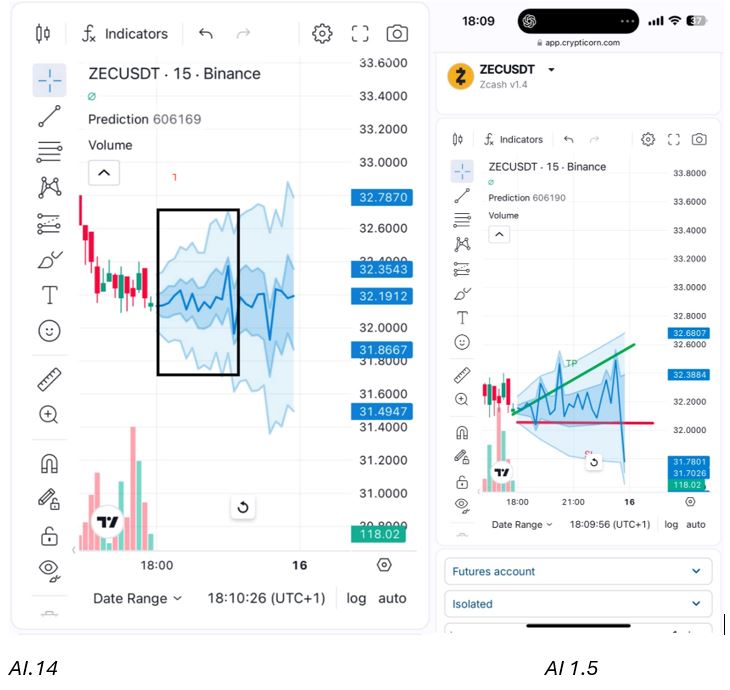
AI 1.4 showed a wider gap between the suggested take-profit zone and stop zone, useful when I expected a volatile squeeze. AI 1.5 later compressed that band as the path shifted to a slower grind higher. I started execution on the 1.4 read, then reappraised stops when 1.5 stabilized.
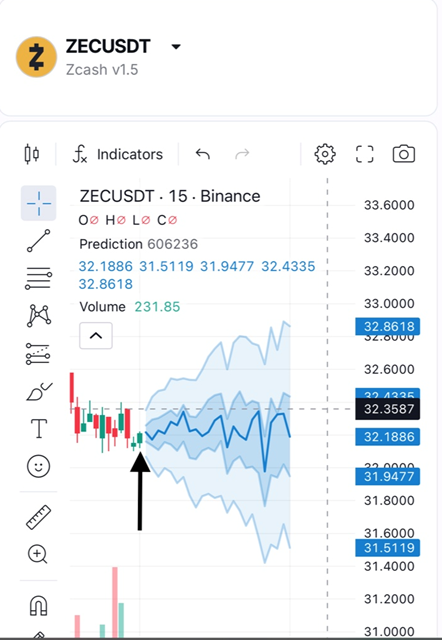
After the update, the median path pointed toward a contained drift higher between roughly $31.86 and $32.35. Still not a guarantee, but a cleaner risk frame than the earlier wide scenario.
Sanity-checking Predictions Against the Live Tape
I compare the dashboard to the actual exchange chart (KuCoin in my desk workflow, but any venue works). In the example above, the dip-and-recover shape matched what I saw on the candles. That is the standard I want before I trust newer pairs.
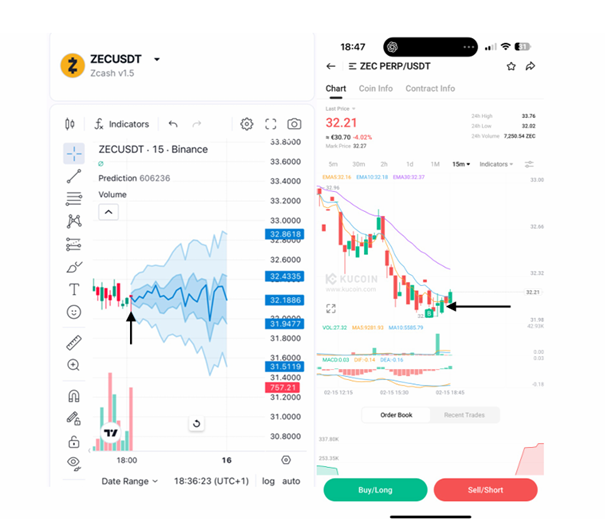
When I Skip (even if the Cone Looks Interesting)
- Band too wide for my stop placement on the exchange I use.
- Coin not in trained coverage and live tape disagrees with the shape.
- Hold time mismatch (swing read on a scalp session, or the reverse).
- Fees and spread on my venue would eat a small edge. Same math as Polymarket crowd odds vs AI forecasts when I trade prediction markets.
For short-horizon up/down windows, I also use up/down crypto predictions and compare model direction to market prices before I click.
Faq
How do you use AI crypto predictions for trading?
Read the probability cone first, skip wide bands, align model refresh speed with hold time, sanity-check against live candles, then size with a fixed risk cap. The prediction frames uncertainty; it does not replace stops or liquidity checks.
Should I trade every AI prediction?
No. Most windows should be skips. If you feel obligated to act whenever the dashboard updates, treat that as a process bug, not an edge.
What is the P10–P90 band?
It is the range where the model expects price to land most of the time in the chosen window. Wide band = high uncertainty. Narrow band = the model sees a tighter path (still not a guarantee).
Which AI version should I use, 1.4 or 1.5?
Use 1.5 for slower holds (hours to weeks) and when you are learning the workflow. Use 1.4 for active short sessions once sizing and stops are boring and automatic.
Can AI crypto predictions replace technical analysis?
They complement it. The cone summarizes model-based uncertainty; candles, liquidity, and your venue still matter. I use both, but I do not double-count the same information as two independent confirmations.
How accurate are these predictions?
Not exact-price oracles. Judge calibration and short-horizon edge, not marketing win rates. Full breakdown: how accurate AI crypto predictions are.
Where do I start if I am new?
Read what AI crypto price prediction is, then walk through this dashboard workflow on one liquid pair for a few sessions before sizing real money.
Final Takeaway
- Use AI predictions to frame uncertainty, not to outsource conviction.
- P10–P90 width is your first filter; wide cone = no trade.
- Match model speed to hold time; sanity-check on live candles.
- Size small, log outcomes, read the accuracy guide when vendors flash huge win rates.
Open the Prediction Dashboard and practice the skip-first workflow on one pair you already trade.
Written by Johannes Thüroff, M.Eng.
Not financial advice. See Disclaimer.
Further reading
Crypto Price Prediction
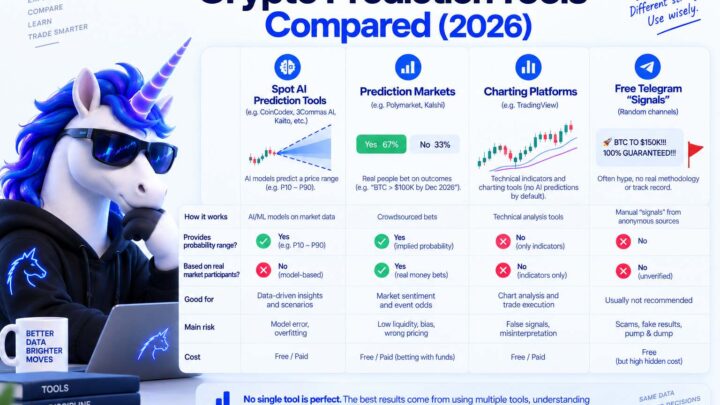
Crypto Prediction Tools Compared (2026): Platforms, Aggregators, and What to Avoid
Crypto Price Prediction
Polymarket Crypto Price Predictions: Crowd Odds vs AI Forecasts (2026)
Crypto Price Prediction
How Accurate Are AI Crypto Price Predictions? (2026)
Crypto Price Prediction
Best Crypto Prediction Markets for 2026 (Honest Comparison)

Crypto Price Prediction
Crypto Trading Basics Trend - Part 1

Crypto Futures